Sunday, April 5, 2009

COD signing

We need to obtain a signing key from Blackberry portal (https://www.blackberry.com/SignedKeys/) and install it to signing machine. Obtaining signing keys takes minimum 48 hours. Once obtain the signing key follow below steps.

Note: Once signing key is installed on one machine, it cannot install on other machine. You can still sign document from another.

Register for a RIM Signing Authority account

You must have HTTP access to the Internet to register for code signing
1. Save the .csi files that RIM e-mails you. The .csi file contains a list of signatures and your registration information.


2. Double-click the one of the .csi file.


3. Double-click a .csi file.
If a dialog box as below appears that states that a private key cannot be found, perform the following actions before you continue:


  • Click Yes to create a new key pair file.

  • Type a password for your private key, and retype to confirm and Click OK.


  • Move your mouse to generate data for a new private key.
4. In the Registration PIN field, type the PIN that RIM provided.

5. In the Private Key Password field, type a password of at least eight characters. This is your private key password, which protects your private key.

Note: Protect your private key password. If you lose this password, you must register with RIM again. If this password is stolen, contact RIM immediately.

6. Click Register.
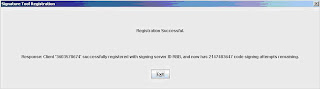

7. Click Exit.

Friday, April 3, 2009

SFTP using SSh: Key pair generation

ssh (SSH client) is a program for logging into a remote machine and for executing commands on a remote machine. It is intended to replace rlogin and rsh, and provide secure encrypted communications between two untrust-ed hosts over an insecure network. X11 connections and arbitrary TCP ports can also be forwarded over the secure channel.

ssh-keygen generates, manages and converts authentication keys for ssh(1). ssh-keygen can create RSA keys for use by SSH protocol version 1 and RSA or DSA keys for use by SSH protocol version 2. The type of key to be generated is specified with the -t option. If invoked without any arguments, ssh-keygen will generate an RSA key for use in SSH protocol 2 connections.

Normally this program generates the key and asks for a file in which to store the private key. The public key is stored in a file with the same name but ``.pub'' appended. The program also asks for a passphrase. The passphrase may be empty to indicate no passphrase (host keys must have anempty passphrase), or it may be a string of arbitrary length. A passphrase is similar to a password, except it can be a phrase with a se-ries of words, punctuation, numbers, whitespace, or any string of charac-ters you want. Good passphrases are 10-30 characters long, are not simple sentences or otherwise easily guessable (English prose has only 1-2 bits of entropy per character, and provides very bad passphrases), andcontain a mix of upper and lowercase letters, numbers, and non-alphanu-meric characters. The passphrase can be changed later by using the -p option.

Option argument :
-t type
Specifies the type of key to create. The possible values are
``rsa1'' for protocol version 1 and ``rsa'' or ``dsa'' for proto-
col version 2.

Steps:
1. Run "ssh-keygen -t dsa", two files will be generated: id_dsa.pub and
id_dsa.

2. Run ssh-keygen -e -f id_dsa > SSH_id_dsa.pub

SSH_id_dsa.pub file than can be send to the remote place with which you are going to communicate.

Sunday, March 22, 2009

Code Signing: Windows

Below link provides straight foraward, easy steps for cab file signing for windows application.

Windows signing by verisign

Sunday, March 15, 2009

Code Signing: Java application Part-1

First of all sorry for the format of this document.
Each of the mobile platform has a code signing process that will verify that the mobile application is authentic. The objective of code signing is to ensure that mobile applications is well trusted, virus-free, and traceable to the company.


Verisign ACS (Authenticated Content Signing) Portal issues certificates for various mobile platforms. It has a good diagram on how mobile code signing works:


These instructions provide an overview of obtaining and using Sun Java signing and a
VeriSign Digital Certificate. The steps covered here are using the command promt utility. Other way around is to used J2ME's Utility for MIDLet signing if you are signing an j2me application.


  1. Download the Java 2 SDK.
    The Java2 SDK for all platforms is available free of charge from java.sun.com.

    We will be using the following tools to apply for your VeriSign Code Signing Digital Certificate and sign your code: keytool, jar, and jarsigner.


  2. Generate a public/private key pair.
    If you are novice (like i was before starting my first code signing task), i recommend you read my another blog entry to get know how of security terms like keypair, keystore and etc. Enter the following code, specifying an alias for your keystore, to generate a public/private key pair:

    C:\> C:\jdk1.3\bin\keytool -genkey -keyalg rsa -alias MyCert

    In this string, the keystore alias is MyCert and algorithm used is RSA.
    Keytool responds with prompts to enter a password for your keystore and your name,
    organization, and address information. The public/private key pair generated by keytool is saved to your keystore and will be used to sign Java applets and applications.

    Note: Your private key is never sent to VeriSign, so if you lose it, you will be unable to sign code. If your private key is lost or stolen, please contact VeriSign to cancel your certificate.


  3. Generate a certificate signing request (CSR).
    Enter the following code to generate a CSR:

    C:\>C:\jdk1.3\bin\keytool -certreq -alias MyCert

    In this string, keytool is requested to create a CSR for the key pair in the keystore MyCert.
    After prompting you to enter the password for your keystore, keytool will generate a CSR
    similar to the following:

    -----BEGIN NEW CODE SIGNING ID REQUEST-----

    MIIBtjCCAR8CAQAwdjELMAkGA1UEBhMCVVMxCzAJBgNVBAgTAkNBMRIwEAYDVQQHE
    wlDdXBlcnRpbm8xGTAXBgNVBAoTEFN1biBNaWNyb3N5c3RlbXMxFjAUBgNVBAsTDU
    phdmEgU29mdHdhcmUxEzARBgNVBAMTClN0YW5sZXkgSG8wgZ8wDQYJKoZIhvcNAQE
    BBQADgY0AMIGJAoGBALTgU8PovA4y59eboPjY65BwCSc/zPqtOZKJlaW4WP+Uhmeb
    E+T2Mho7P5zXjGf7elo3tV5uI3vzgGfnhgpf73EoMow8EJhly4/YsXKqeJEqqvNog
    zAD+qUv7Ld6dLOv0CO5qvpmBAO6mfaI1XAgx/4xU/6i6u6TLLOvgv9pMNUo6v1qB0
    xly1faizjimVYBwLhOenkA3Bw7S8UIVfdv84cO9dFUGcr/Pfrl3GtQ==


    -----END NEW CODE SIGNING ID REQUEST-----


    This string is an example of a CSR generated using keytool. A CSR contains a copy of the requestor’s public key and a hash of the data entered in step 2 signed with the requestor’s private key.

    Copy the CSR and paste it into the VeriSign Sun Java Code Signing Digital Certificate application form, accessible at
    http://www.verisign.com/products/signing/index.html.

    When your request is approved, VeriSign attaches your Sun Java Code Signing Digital
    Certificate to your confirmation email.

    Upon receipt, the attached certificate is saved to a file on your computer.
    A digital certificate is a “trust path” or “chain” back to the VeriSign root certificate. This trust path enables your code to be validated on any standard JRE without installing any additional files. Note: VeriSign takes a number of steps to verify your identity. For commercial publishers, VeriSign does a considerable amount of background checking. As a result, it will take approximately 3-5 business days to verify your information and issue a certificate.


  4. Import your Digital Certificate.
    Enter the following code, with the path to your certificate, to import the chain into
    your keystore.

    C:\>C:\jdk1.3\bin\keytool -import -alias MyCert -file ABhiNew.cer

    In this string, keytool is requested to import the Digital ID “ABhiNew.cer” into the
    keystore MyCert.


  5. Bundle your applet into a Java Application Resource (JAR) file.
    Use jar to bundle your applets or applications as a JAR file.
    C:>C:\jdk1.3\bin\jar cvf C:\TestApplet.jar
    This string creates a JAR file “C:\TestApplet.jar.” The JAR file contains all the files under the current directory and its subdirectories.
    JAR responds with:

    added manifest
    adding: TestApplet.class (in = 94208) (out= 20103)(deflated 78%)
    adding: TestHelper.class (in = 16384) (out= 779)(deflated 95%)


  6. Sign your applet.
    Use jarsigner to sign the JAR file, using the private key you saved in your keystore.

    C:\>C:\jdk1.3\bin\jarsigner C:\TestApplet.jar MyCert

    At the prompt, enter the password to your keystore. Jarsigner hashes your applet or application and stores the hash in the JAR file created in step 5 with a copy of your certificate.
    Verify the output of your signed JAR file.

    C:>C:\jdk1.3\bin\jarsigner -verify -verbose -certs d:\TestApplet.jar

    This string verifies that the files have been saved to the JAR file and that the signature is correct.When the signed JAR file is downloaded, the JRE displays your VeriSign Digital Certificate to the user. If the file is tampered with in any way after it has been signed, the user will be notified and given the option of refusing installation.

Some of the really good links i would like to share here are:

http://java.sun.com/javame/reference/docs/sjwc-2.0-web/docs/ToolsGuide-html/jadtool.html

http://www.spindriftpages.net/blog/dave/2006/06/18/midlet-jar-signing-a-tutorial-revised/

Monday, October 13, 2008

Object Orientation (Chap-2) goes smoothly as well.

Object Orientation goes smoothly as well.

Cool. It didn't take much time to complete the chapter. It was

interesting. Nothing new was there, but was testing the awareness

around java world. Exam was good i think for chapter 2. I scored 11

out of 14. Chapter 3 looks lenghty but got a week to do it. So

chill out.

Monday, October 6, 2008

Chap1: Declaration and access control

Many of my new book kick off lasted for first chapter only. For example when I started reading “hibernate in action“, “webwork in action“, “ejb in action”, I was hardly able to close first chapter. But this time I’m firm. More determinant than ever. My other blog (http://abhi-java.blogspot.com) is also starving of new article.

As the names suggest the whole chapter was about pretty simple basic java stuff. But guess what? My test was horrible. I could solve only 5 out of 10 questions correctly. Anyways next chapter is due by coming Monday. So I got 2.5 days to finish the chapter. By finish I don’t mean to go through all pages but going through them from top to bottom At least next exam should score at least 80%.

Friday, July 18, 2008

Java refactoring Part-3

The creation of a good mental model is one of the key challenges in developing software. One way to build this model is by giving good names to your code. People should code not only for themselves but also for others as well.

I took interview yesterday for placement in my compnay. A saw the an answer given by a candidate as "Understanding code of others" in reply to the question " what do you hate most about software industry?".

Can you believe it how disgusting it feels when you read a bad code. Anyways not going further i've discussed some smells related names and refactoring for them in below presentation.


Click here to start presentation --> Measured Smells & Names

Java refactoring Part-2

The smells in this chapter are similar. They're dead easy to detect. They're
objective (once you decide on a way to count and a maximum acceptable score).
They're odious.

Click here to start presentation --> Measured Smells

Java Refactoring Part-1

Refactoring-the art of improving the design of existing code safely-provides an
efficient, reliable system for bringing order to the chaos, and one that keeps
the surprises to a minimum!

Click Here to start with first Presentation